The first version of this lived in Lovable. It was a Burgundy map with village markers and a way to log bottles I wanted to try before a trip to France. It got me through the trip, which is more than most side projects can claim. But it had a ceiling. The vineyard-level maps I really wanted — the ones that show Le Chambertin as a distinct shape next to Latricières-Chambertin next to Charmes-Chambertin — those never quite worked. The data wasn't there, and even if it had been, the tool I was using couldn't render it cleanly.
So I started over in Claude Code. What I have now is something different. Not a polished consumer app — I don't think it's going to displace CellarTracker — but a personal tool that does things I couldn't find anywhere else. A cellar that knows its own geometry. Maps that pull from official government data and render named vineyards correctly. A natural language search that actually understands my collection. And a few features that don't quite work as well as I'd like, which I'll get to.
This is the project that taught me what AI-assisted development can really do when you stay with it long enough.
What it actually does
The app is organized around six tabs: Collection, Cellar, Wishlist, Dashboard, Maps, and Ask AI. Each one does something different, and the interesting parts aren't always where you'd expect.
The cellar, in three dimensions
The most satisfying feature to use is also the simplest in concept. Each physical wine rack gets rendered as a pyramid of circles — wider at the bottom, narrower at the top — mirroring how the bottles actually stack inside an Artevino unit. I can place sections in the app to match where they sit in my cellar. Bottom-left in the app is bottom-left in real life.
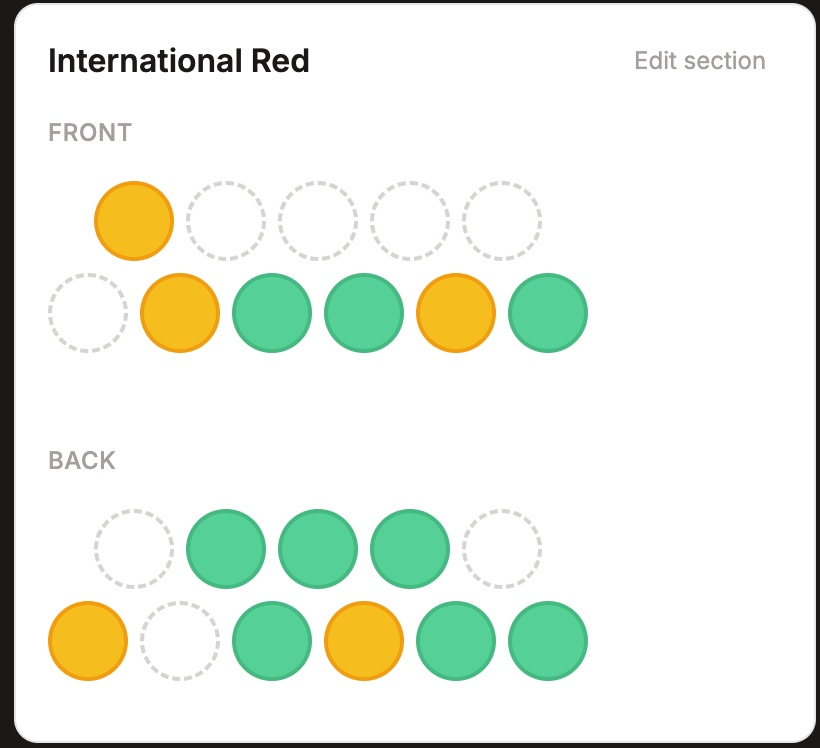
Every slot is a real bottle. Each one is color-coded by where it is in its drinking window — green at peak, yellow approaching, blue still aging, red past peak. The colors aren't aspirational; they're calculated by Claude's API, which I'll come back to.
This is one of those features that sounds trivial until you live with it. Knowing that bottle 3,1 in the front of the International Red rack is the 2016 Frank Family Winston Hill — without opening anything — is a small daily luxury.
The app supports multiple cellars, which I added late. The original architecture assumed one storage location. Then I started keeping bottles in two places, realized I wanted them logically separated but searchable together, and bolted on the multi-cellar feature. Most of my favorite parts of this app are features I added after v1 existed and I was actually using it.
The bottle, in full context
Behind every dot in the rack is a structured record. Producer, wine name, vintage, varietal, region, appellation, sub-appellation, purchase price, bin location. Importing existing collections from a spreadsheet works too, which matters for anyone with years of data already living somewhere else.
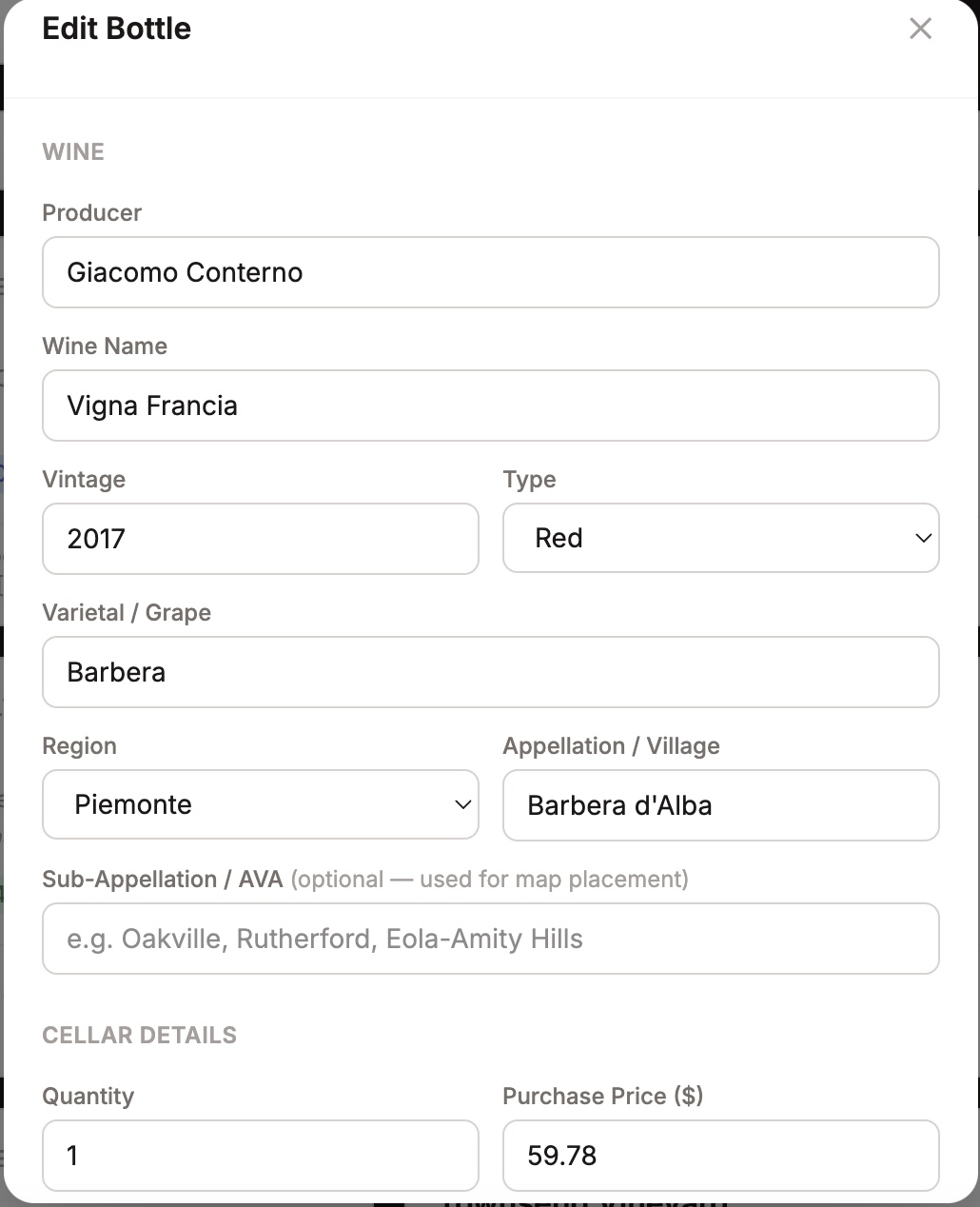
The sub-appellation field is one I didn't anticipate needing. California wines need to be tagged at both the Napa Valley level and the Oakville or Rutherford level, or the maps don't know where to place them. The slight overengineering on the metadata schema is what makes the maps possible.
Three AI features, two that work, one that doesn't
The app calls Claude's API in three different places, with three different levels of success.
The drinking window analysis runs across the whole collection. Each bottle gets a calculated peak range (e.g. "2027-2035") and a status (Not Ready / Approaching / At Peak / Past Peak), which is what drives the color coding on the cellar racks and the Cellar Health view on the Dashboard.
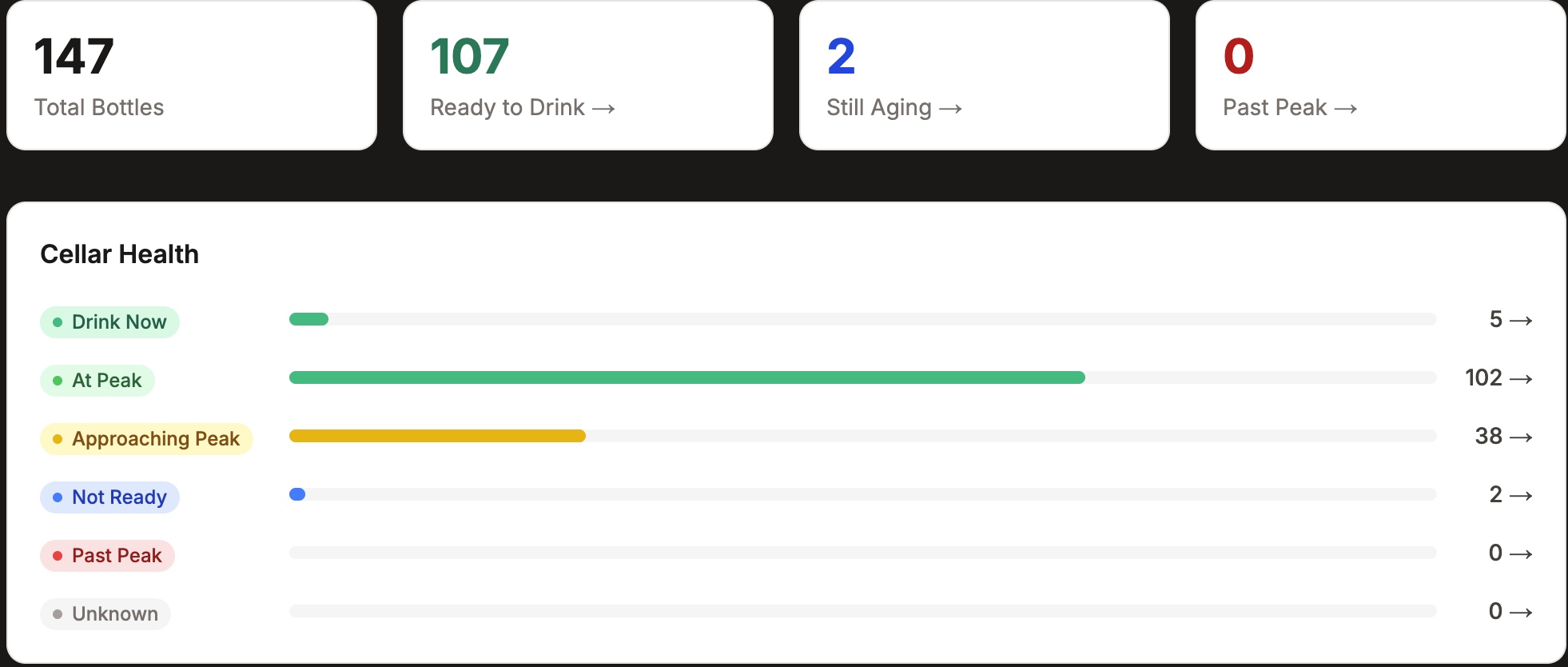
This works, but with a caveat. The windows the AI returns are wide — usually 8-10 years per bottle — which means the cellar overwhelmingly reads as "ready to drink." That's partly accurate (most of my collection is mature enough to drink) and partly a limitation of how the AI is prompted. A more precise version would feed it actual vintage notes from critics like Vinous or Burghound for each producer, rather than relying on general aging patterns. That's a future enhancement.
The natural language Ask AI is the most powerful feature in the app. It used to live buried inside the Cellar tab. I recently promoted it to its own tab because I realized I'd built something genuinely useful and then hidden it.
You can ask things like "what's my best Pinot Noir under $75 to pair with mushroom pizza" or "what Italian wines should I open this weekend" and get back a curated short list from your actual collection, with drinkability status and bin location. It's not just searching — it's reasoning across structured data and contextual judgment. The difference between "show me Pinot under $75" and "what's my best Pinot under $75 for mushroom pizza" is the kind of recommendation a knowledgeable sommelier friend would give. Having it built into a personal cellar tracker is genuinely useful.
The cellar optimization feature is the one that doesn't quite work. The idea was: feed Claude the rack capacities, let it see the collection, and ask it to recommend how to organize the shelves — group by region, optimize for drinkability, segregate by varietal, whatever makes sense. In practice the output is too free-form to act on. The task as currently specified gives Claude too much latitude and not enough structure. When I come back to this, the fix will probably be turning it into a multi-step process with explicit goals and constraints, rather than a single open-ended ask.
I'm leaving the broken feature in the app rather than removing it. Partly because it occasionally produces something interesting. Partly because pretending the AI integrations are all polished would be dishonest.
The wishlist, doing more work than it looks like
I have 488 wines on the wishlist. Each one is a bottle I read about somewhere, heard recommended, or flagged as worth tracking down. Each one has a source attribution where I remembered to add it — "Dan Keeling: Death Row Wines," "Pinnacle," sommelier notes from specific dinners.
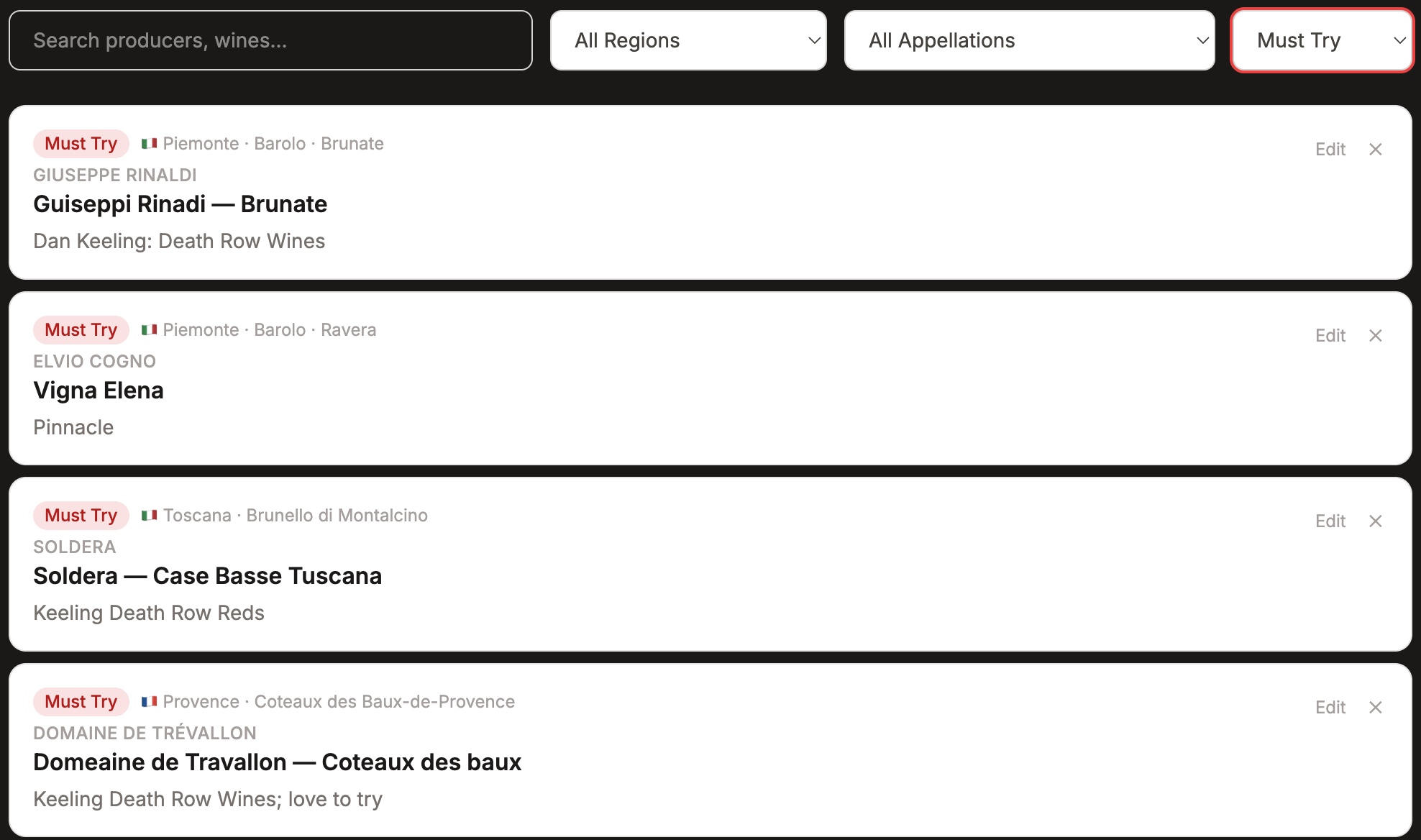
The use case I built it for: when I'm at a restaurant with a serious wine list, I can filter to a specific region — say, Piemonte → Barolo — and instantly see my shortlist. That's the unlock. Without structured metadata, a wishlist decays into a graveyard of forgotten names. With it, the list compounds in usefulness over time.
The wishlist also connects to the maps. When you look at the Burgundy map and see orange wishlist borders on Vosne-Romanée or Hermitage, those aren't generic flags — they're tied to specific producers and wines from this list. The wishlist isn't an isolated feature; it's part of a connected system.
The maps, which are the part I'm proudest of
This is where the project went from "useful personal tool" to something I genuinely couldn't have built without the right data sources and an AI to help me wrangle them.
The original Lovable version had village-level markers — Gevrey-Chambertin, Vosne-Romanée, Chambolle-Musigny — and that was useful. But it stopped there. The dream was always vineyard-level: being able to click into a village and see the actual climats drawn on the map. Le Chambertin as one shape. Les Amoureuses next door. The Grands Crus distinct from the Premier Crus distinct from the Village-level parcels.
For Burgundy, this turned out to be possible. The French government, through the INAO (Institut National de l'Origine et de la Qualité), publishes the official AOC parcel boundaries as open data. Every Grand Cru, every Premier Cru climat, every village appellation — drawn precisely, updated regularly, free for anyone to use. Once I had the data, the hard part became processing it: filtering tens of thousands of parcels down to Burgundy only, classifying them correctly (Grand Crus follow two different data patterns, which took some debugging to figure out), and extracting the climat names from the official labels.
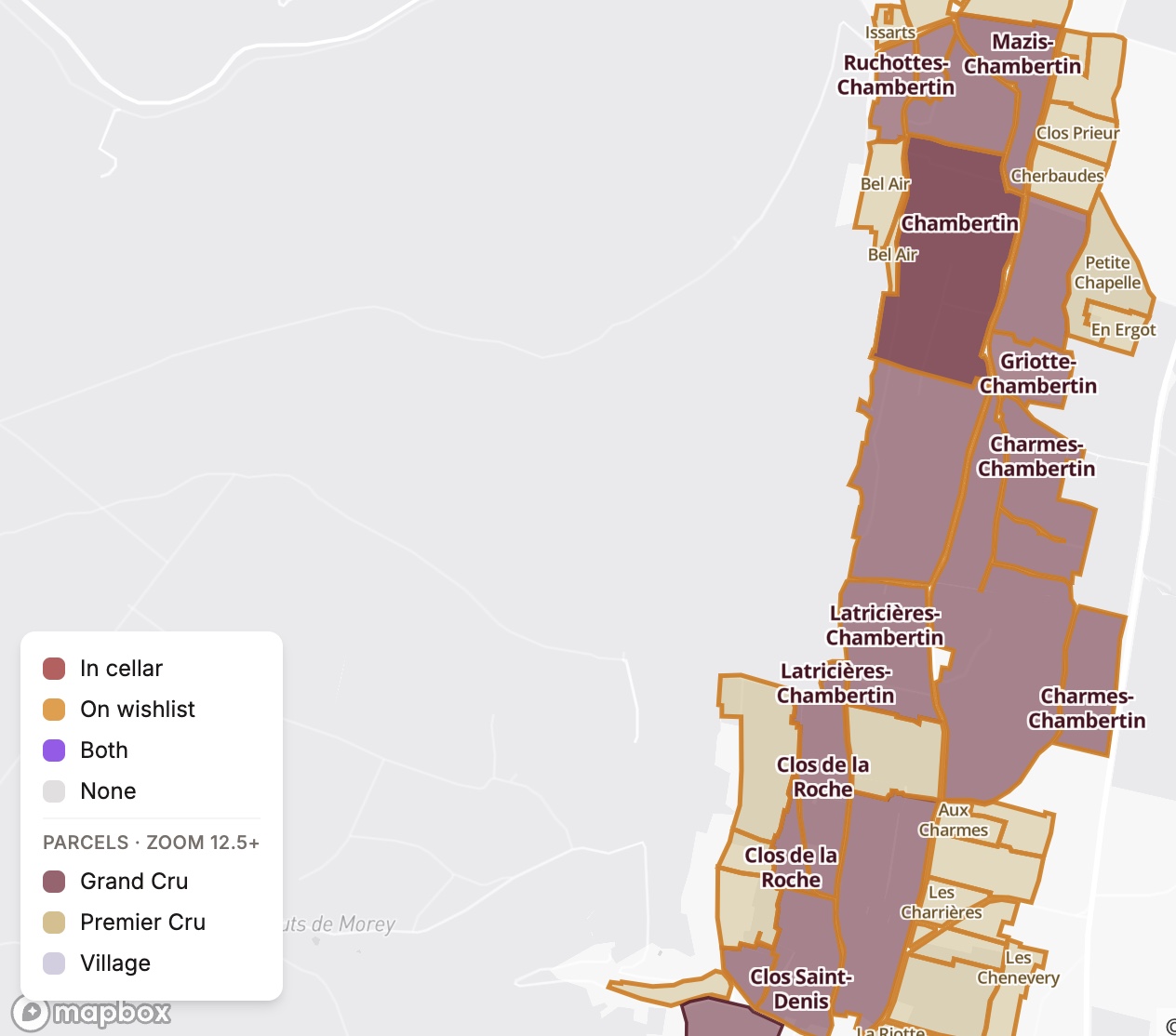
The result is a map where every famous vineyard in Burgundy is rendered in its actual shape, with its actual name. Grand Crus in deep burgundy. Premier Crus in muted gold. Village-level parcels as quiet context. When I have a bottle from a specific climat, the polygon picks up a status border — a thicker outline in cellar color or wishlist color — so the map serves double duty as both reference and collection tracker.
For Piemonte, the data was harder to find. The Italian equivalent of INAO doesn't publish MGA boundaries openly. But the Consorzio di Tutela Barolo Barbaresco runs a public GIS portal, and with some patient probing it turned out to expose the data through an accessible API. Two hundred and sixty-one MGA polygons — every named cru in Barolo and Barbaresco, including Cannubi and its four sub-MGAs, Brunate (which spans two communes), Bussia, Vigna Rionda, Rocche di Castiglione, Asili, Rabajà, Martinenga, Pajè.
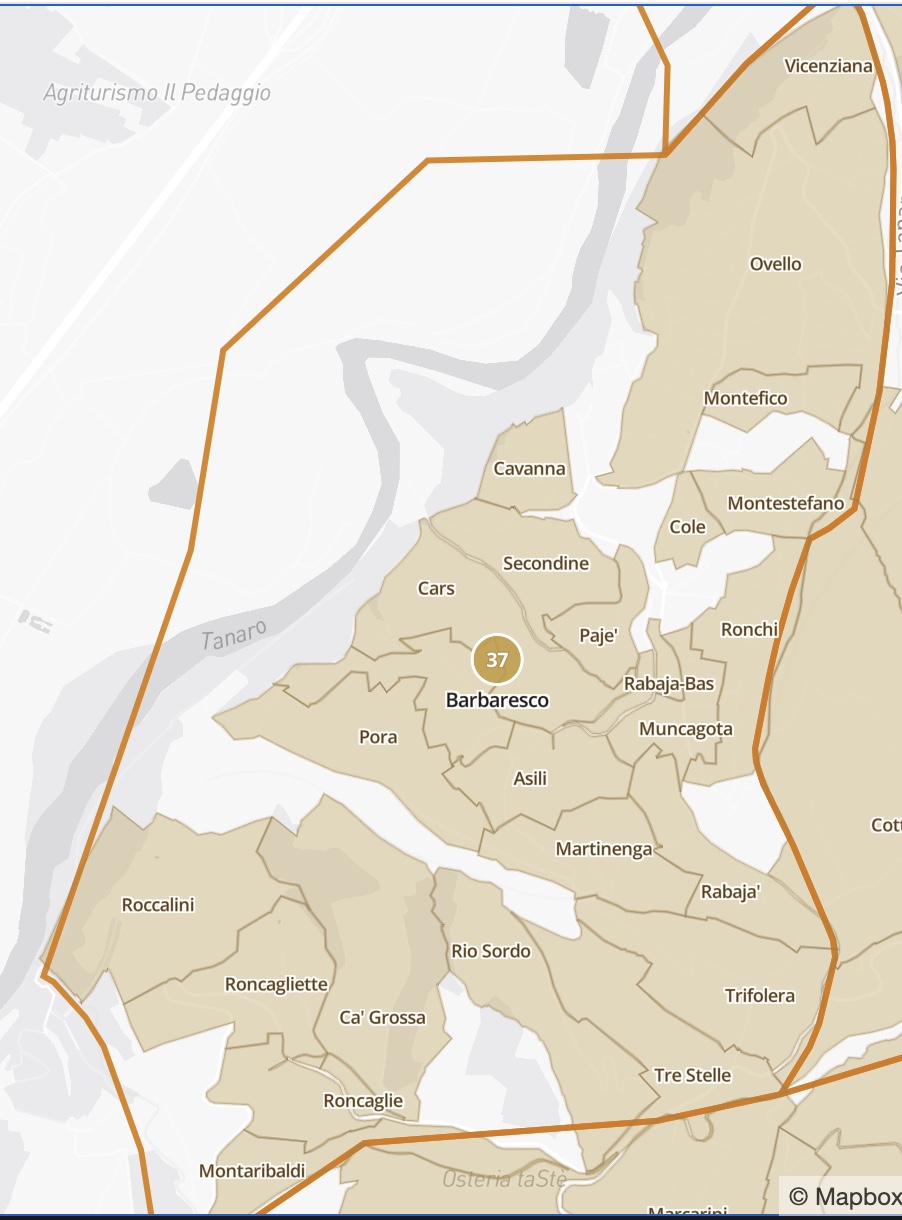
Seeing Asili and Rabajà and Martinenga rendered correctly on a map I built was a moment. Those are some of the most legendary named vineyards in Italy. The information exists in books — Alessandro Masnaghetti has spent decades documenting it. But to my knowledge, it's not available in any consumer wine app. Vivino doesn't have it. CellarTracker doesn't have it. My personal cellar app does.
The other regions follow similar patterns at appropriate depth. The Rhône is rendered at the appellation level — the eight Northern crus styled in cool granite tones to match their character, the major Southern crus in warm Provençal tones. Oregon's Willamette Valley uses sub-AVA polygons for Dundee Hills, Eola-Amity Hills, Yamhill-Carlton, Ribbon Ridge, Chehalem Mountains. Napa Valley uses the sub-AVAs that actually matter for collecting — Oakville, Rutherford, Stags Leap District, Howell Mountain, Diamond Mountain, Atlas Peak, Spring Mountain District, Calistoga, Coombsville, Yountville.
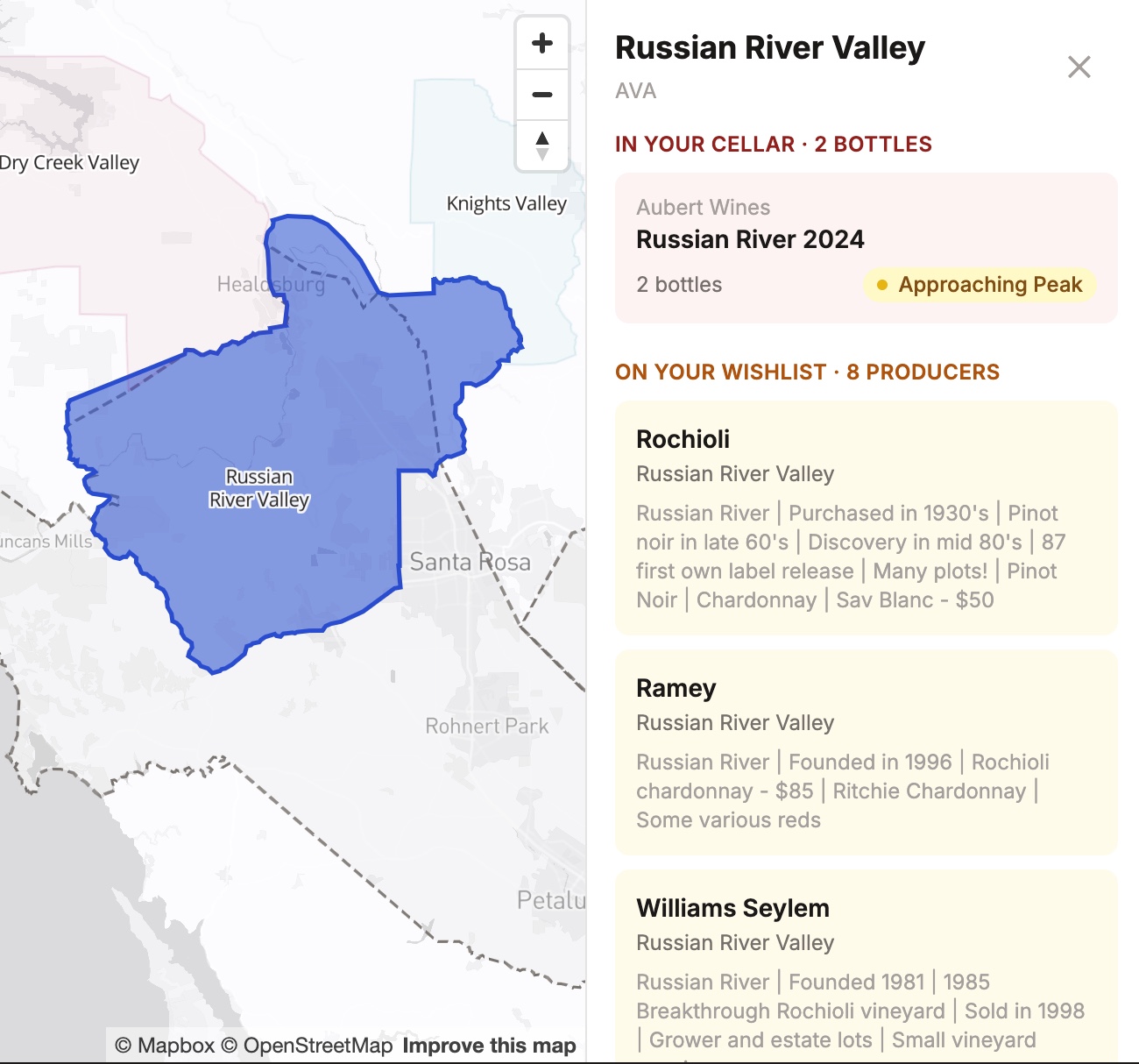
Each region was its own data-sourcing puzzle. Each one taught me something about working with geographic data. None of them would have been possible without Claude Code's ability to fail fast, diagnose precisely, and try again.
What I learned
A few things stand out from the build.
Data sourcing matters more than tooling. The reason Burgundy and Piemonte ended up authoritative is that I tracked down the right datasets — INAO for France, the Consorzio GIS portal for Italy. The original Lovable version felt thin because it relied on generated content with no underlying ground truth. Where the data is good, the maps are good. Where it's mediocre, no amount of clever rendering saves it.
Iteration with AI is different from iteration alone. A typical bug in this project — say, Grand Crus not rendering correctly because the script was checking the wrong INAO field — used to be a wall. You'd hit it, stare at it, give up. With Claude Code, it became a conversation. Diagnose, hypothesize, test, refine. The pace of learning compounded faster than I expected.
Not every AI feature is going to be a hit. The drinking windows are wide. The cellar optimization is too vague to act on. The Ask AI was buried for months before I noticed how good it was. Building with AI doesn't mean every AI feature works perfectly — it means iterating on the ones that do and being honest about the ones that don't.
Shipping imperfect beats waiting for perfect. Most of what I love about this app are features I added after the first version was "done." The pyramid rack visualization. The status borders on map polygons. The sub-appellation hierarchy. Multi-cellar support. The Ask AI tab promotion. None of them existed in v1. They got added because v1 existed and I was using it and noticing what was missing.
What's next
A few directions worth exploring once I've shared the app with friends and gotten real-world feedback:
Tighter drinking windows, probably by feeding Claude actual critic reference data per producer rather than relying on general aging patterns. A purchasing dashboard — what I'm actually buying over time versus what I think I'm buying. Better optimize-cellar logic with explicit constraints instead of free-form prompting. Maybe a Champagne map. Maybe Bordeaux, though that classification system is its own beast.
For now, though, the app does what I built it for. It tells me what I have, where it is, when to drink it, and what part of the world it came from. It's the wine cellar tool I always wanted and could never find. Built over a few months of evenings, with an AI as the actual builder and me as the person who knew what to ask for.
Built with Claude Code · Data from INAO (France), Consorzio di Tutela Barolo Barbaresco (Italy), data.gouv.fr, and OpenStreetMap · Spring 2026